Adobe Journey Optimizer Events: Unitary vs Business Events for Real-Time Personalization
In Adobe Experience Platform (AEP), all experience events are generally treated the same. On the other hand, Adobe Journey Optimizer (AJO) introduces two categories of events that fuel customer journeys: Unitary events and Business events.
Understanding these types is important for anyone looking to automate personalized experiences using AJO. In this article, I will try to explain the differences between Unitary and Business events, discuss why Unitary events are key to one-to-one personalization, give a high-level overview (with a few technical hints) on configuring these events.
What is the difference between Unitary and Business Event in AJO?
Why Focus on Unitary Events for Personalization?
High-Level Guide for Configuration of Unitary Events in AJO
Automating Personalization
What is the difference between Unitary and Business Event in AJO?
In Adobe Journey Optimizer we can leverage two main event types to trigger customer journeys and interact with our audiences.
Unitary Events
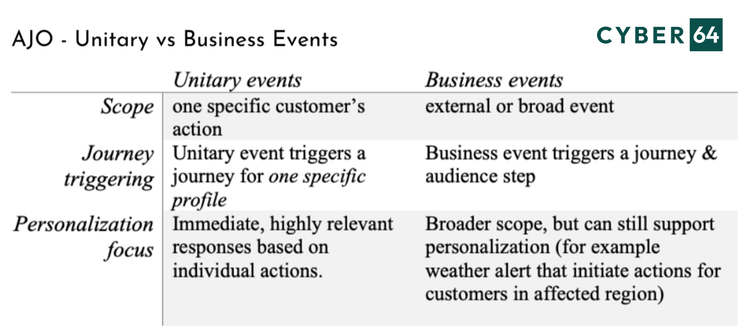
Unitary events are linked to an individual customer profile and typically represent that person’s behavior or actions. For example, a person purchased a product, visited a website or store, or reached a loyalty points milestone. AJO listens for these person-specific events in real time to decide the next best action for that individual.
Business Events
Business events are not tied to a single person but rather to a broader occurrence. Examples are news alerts, flight cancellations, or inventory restocks. All events that happen outside any one customer’s direct action. These require defining a segment of profiles that should receive the journey.
Why Focus on Unitary Events for Personalization?
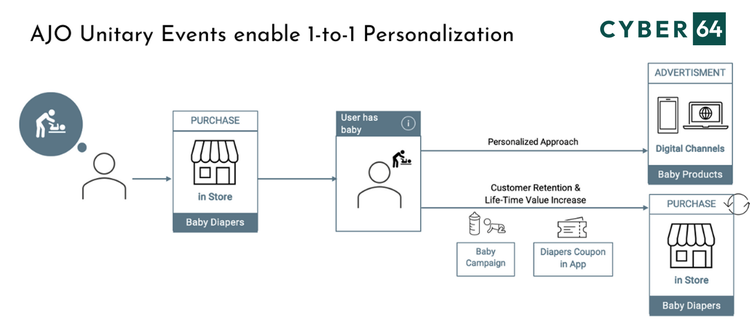
For most real-time personalization use cases, Unitary events are the way to go. Since they are tied to individual customer behavior, they enable things like:
- Abandoned Cart Reminders personalized with actual products
- Welcome Journeys triggered by individual sign-ups in real-time
- Loyalty Rewards sent at the exact moment a milestone is reached
High-Level Guide for Configuration of Unitary Events in AJO
The setup is done in configuration menu that can be accessed in the AJO sidebar Administration > Configurations > Events.
💡 Hint: When configuring, be sure to open Adobe Journey Optimizer Application, and not Experience Platform on the Experience Cloud account.
Create a new Event with the following properties:
- Event Type = Unitary.
- Choose event ID type = Rule-based (based on conditions).
- Select the schema and payload fields relevant for the journey.
- Select the namespace and Profile identifier.
To make everything work together, your identity fields should be correctly mapped in the Event Schema and that the event is streamed into AEP (batch ingestion won't trigger journeys and we are anyway talking about the real time, 1-on-1 personalization).
Automating Personalization
With Unitary events, you can react instantly to customer behaviors. It unlocks capability to send timely, relevant messages that respond directly to individual actions, such as a completed purchase or a cart abandonment.
Unitary events also allow for deep personalization, using both the payload of the event and the customer's profile data. Each interaction feels tailored and relevant to the recipient.
Unitary events support the design of flexible journeys that can combine both one-to-one and one-to-many engagement strategies. This allows us to meet customers where they are in their journey, with content that resonates in real time.