Adobe Target Part 4: Success Metrics and How to Measure What is Important

In Part 3, we opened the hood on each activity type and looked at how experiences are composed, how traffic is allocated, and when to use each one. But none of that matters if you are measuring the wrong thing. The success metric is the single most important decision you make when setting up an activity. It determines what "winning" means.
This article covers the three categories of success metrics in Adobe Target, how to configure them, the advanced settings that most teams overlook, and how A4T (Analytics for Target) changes the game.
What is a success metric?
Conversion metrics
Revenue metrics
Engagement metrics
What about primary vs. additional metrics?
Advanced settings (Target reporting source only)
How does A4T change things?
Quick-reference: choosing your metrics
What is a success metric?
A success metric is the goal of your activity. It is the specific user action or outcome that defines whether a test variation is working. When you create an A/B test, Experience Targeting campaign, or any other activity, you designate a success metric that will be tracked to determine success.
Adobe Target counts success metrics per visitor by default. Each visitor is counted only once for a conversion-type metric unless you explicitly change this. This prevents a single user from inflating your conversion rate by converting multiple times.
There are three types or categories.
Conversion metrics
Conversion metrics measure whether visitors complete a defined action. You configure a conversion metric by choosing a trigger that fires when the action occurs.
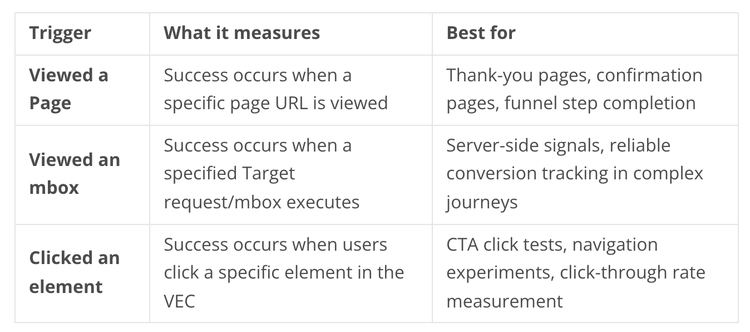
Each trigger has its own implementation considerations:
- Page view triggers require Target to be present on the target page. In single-page applications (SPAs), route changes may not reload the page, so conversions can undercount if you are not tracking view change events.
- Mbox triggers are often the most reliable method in complex journeys, but keep your conversion mboxes purpose-specific. If the same mbox fires on multiple pages, the conversion meaning becomes ambiguous.
- Click triggers depend on stable DOM selectors. Dynamic elements and UI changes after releases can break the click selector. Always QA click goals after deployments.
Revenue metrics
Revenue metrics tie directly to monetary outcomes. You can select only one revenue metric per activity.
The revenue conversion point is typically an order confirmation mbox. You must pass order details (order ID and revenue amount) at conversion time. By default, only the first order per visitor is used for calculations like Revenue per Visitor (RPV), Average Order Value (AOV), and Total Sales. Subsequent orders by the same visitor increment the conversion count but do not add to revenue totals. This prevents a single user from inflating revenue-based metrics.
Watch out for:
- Currency handling. Make sure your implementation passes revenue in a consistent currency. Mixed currencies will produce meaningless results.
- Multiple orders. If users place multiple orders during a test window, validate how your organization attributes the totals. The default "first order only" behavior may or may not match your reporting expectations.
- QA orders. Test with real order data in a staging environment to confirm that order ID and revenue values are passing correctly before going live.
Engagement metrics
Engagement metrics measure visitor behavior during a session rather than a binary conversion event. Adobe Target provides three engagement metrics:
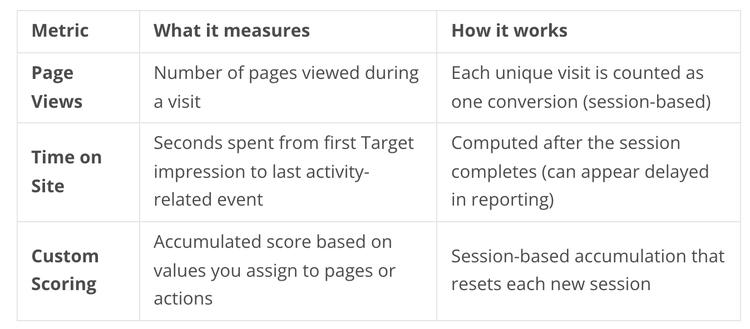
Engagement metrics reset every session. A visitor must start a new session (30+ minutes of inactivity) and re-qualify for the activity to increment the metric again. Because of session-based counting, the full results are recorded once the session ends.
Custom Scoring (also called Capture Score) is powerful for complex journeys where a binary conversion does not capture the full picture. You assign point values to pages or actions to quantify visit quality. For example, a lead-quality journey might score 1 point for viewing a product page, 3 points for downloading a datasheet, and 10 points for requesting a demo. But be careful: your scoring model can bias results if point values are not validated against actual business outcomes. Document your scoring rules clearly.
What about primary vs. additional metrics?
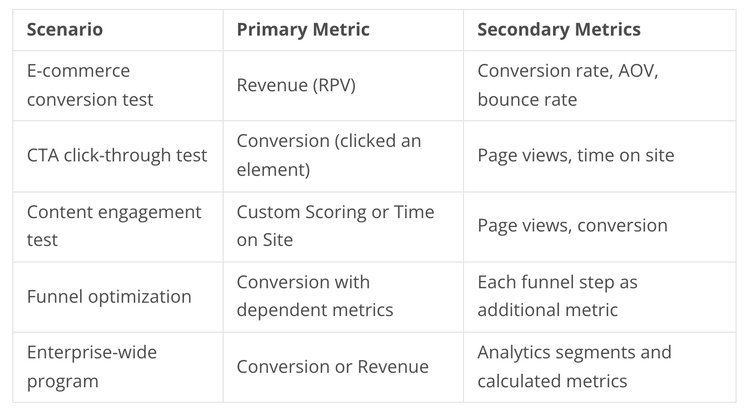
Every activity needs exactly one primary goal metric. This is the metric that determines the winner and drives headline reporting. You can add additional metrics (secondary goals) for diagnostics and broader impact analysis.
The rule here is simple: your primary metric should map to business value. Do not use a micro-metric (like button clicks) as your primary goal unless you are intentionally testing that specific micro-behavior. Use secondary metrics as guardrails. For example, if your primary metric is purchase conversion, you might track bounce rate and average order value as secondary metrics to make sure your winning variant is not achieving conversions at the expense of user experience.
Pre-define which secondary metrics are for decision-making and which are purely diagnostic. Too many secondary metrics can lead to "metric shopping," where you cherry-pick the one that tells the story you want.
Advanced settings (Target reporting source only)
When using Target as your reporting source (not A4T), you get access to three advanced configurations:
Conversion counting
By default, conversions count once per entrant. You can change this to count every occurrence. This is useful for repeat actions like content downloads or repeated interactions. But if you switch to "every impression," interpret your conversion rate carefully. It will not be comparable to once-per-entrant goals.
Post-conversion behavior
Controls what happens after a visitor converts. The default is to keep the user in the activity. You can also release the user and either allow or bar re-entry. This matters for one-time flows like signups where you do not want to keep showing test variants after conversion.
Dependent metrics
Allows Metric B to count only if Metric A happened first. This is useful for funnel analysis. For example, you can count a purchase conversion only after an add-to-cart event. This prevents inflated conversion numbers from visitors who reached the confirmation page through a bookmark or direct link.
Important: Dependent metrics are not supported when using A4T as the reporting source. If you need funnel-based analysis with A4T, build your funnels in Adobe Analytics instead.
How does A4T change things?
Adobe Analytics for Target (A4T) lets you use Analytics metrics, events, and segments for Target activity reporting. Instead of relying on Target's built-in reporting, you push activity data into Analytics and analyze it there.
What you gain:
- Richer segmentation: Apply Analytics segments (new vs. returning, channel, LTV proxies) to Target activity data
- Unified reporting: One source of truth across your organization instead of two separate reporting systems
- Calculated metrics: Use Analytics calculated metrics on Target data for deeper analysis
- Post-hoc flexibility: Marketers can dynamically apply success metrics or reporting segments after the activity is live without needing to define everything upfront
What you lose:
- Advanced settings: Conversion counting, post-conversion behavior, and dependent metrics are not available with A4T. Activities using Analytics as the reporting source always use "Increment Count and Keep User in Activity" with "On Every Impression" counting, and these settings are not configurable.
- Automated Personalization (AP) is not supported: A4T works with A/B tests (Manual, Auto-Allocate, Auto-Target), Experience Targeting, Multivariate Tests, and Recommendations. AP is the only activity type excluded. Also, only one mbox-based metric is allowed when using A4T.If your organization needs deep segmentation, standard enterprise KPIs, or unified reporting, A4T is the right choice. If you need granular control over conversion counting and post-conversion behavior, use Target as the reporting source.
Quick-reference: choosing your metrics
Want to discuss your testing and personalization strategy? Let's connect. Follow for more Adobe Experience Cloud articles and reach out at CYBER64 or https://cyber64.com/