AEM Assets Governance Guide
Digital Asset Management (DAM) governance is a strategic framework that ensures digital assets are organized, accessible, and used effectively across the organization. In Adobe Experience Manager (AEM) Assets, governance serves as the foundation for compliance, scalability, and adoption success. This guide consolidates best practices from my experience, Adobe’s AEM Assets Onboarding series and expert insights from Adobe Champions.
What is DAM Governance?
Five Pillars of Successful DAM Governance
“Think of DAM governance as the blueprint for your brand's operational success. It ensures that every digital asset is not just stored, but is compliant, discoverable, and ready to deliver value across your enterprise.” — Katie Junge, Senior Marketing Technology Product Manager at Workday and AEM Champion
What is DAM Governance?
DAM governance is the combination of:
- Policies: Rules to ensure assets are properly used
- Roles: Defined responsibilities for team members
- Standards: Metadata, naming conventions, taxonomy
- Workflows: Automated asset lifecycle processes
It ensures:
- Correct and consistent use of assets
- Legal and brand compliance
- Accountability and security
- Operational scalability and efficiency
“A DAM without governance quickly becomes a challenge to use. The real value of AEM Assets is unlocked when metadata, permissions, and taxonomy all work together to make content instantly usable and reusable.” — Priya Nair, AEM Technical Lead at Loblaw and AEM Champion
Benefits of Effective Governance
- Prevents unauthorized use and legal risks
- Enables faster search, retrieval, and reuse
- Enforces consistency across global teams
- Aligns marketing, creative, and IT teams
- Accelerates user onboarding and tool adoption
Five Pillars of Successful DAM Governance
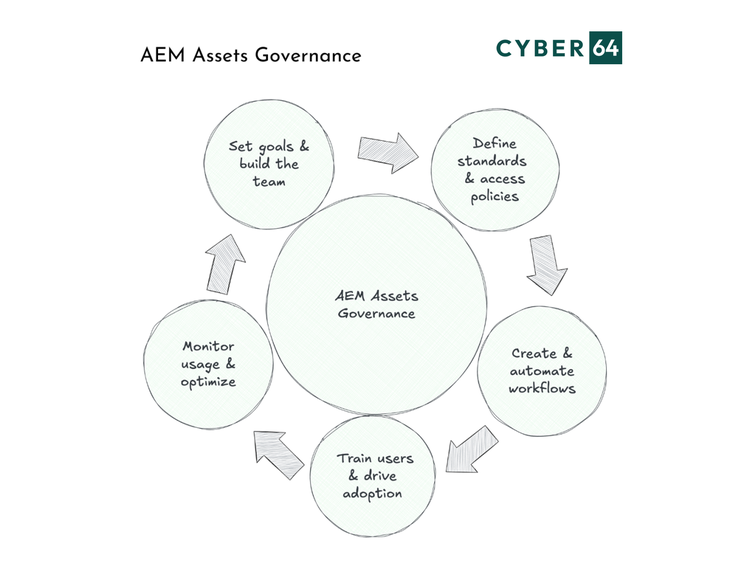
1) Set Clear Goals and Build the Right Team
Purpose: Align governance with business goals like brand consistency, campaign speed, and compliance.
Key Roles:
2) Define Standards and Access Policies
Purpose: Ensure consistency and compliance through enforceable standards.
Standards to Define:
- Folder structure and naming conventions
- Metadata schemas and mandatory fields
- Tagging taxonomy and usage guidelines
Access Policies:
- Role-based permissions
- Rights management (e.g., licensing, embargoed content)
3) Create and Automate Workflows
Purpose: Reduce manual effort and ensure every asset follows a lifecycle.
Recommended Workflows:
- Upload → Review → Approval → Publish → Archive
- Notifications for asset status changes
- Auto-expiry for outdated content
Tooling Tip: Leverage AEM Workflow Models for approvals and asset stage transitions.
4) Train Users and Drive Adoption
Purpose: Empower users with the knowledge to use AEM Assets effectively.
Tactics:
- Role-based onboarding (Admin, Librarian, User)
- Create cheat sheets, how-to videos, and office hours
- Promote learning via Lunch & Learns and internal forums
5) Monitor Usage and Optimize
Purpose: Continuously evaluate the health and efficiency of your DAM.
Monitoring Tools:
- Dashboards for asset usage and system performance
- Audit logs to track user activity
Optimization Activities:
- Retire and archive old assets regularly
- Update metadata schemas to support new campaigns
- Evolve folder structures with changing business needs
Reference: Change Management Essentials for Success
Final Thoughts
Governance in AEM Assets is not a one-time project but an ongoing discipline. By investing in structure, roles, training, and evaluation, organizations unlock the full potential of their DAM, enabling asset reuse, reducing operational risk, and ensuring that digital content is always ready to deliver value.
References
This guide was created by synthesizing my experience with DAM systems and AEM Assets, Adobe’s AEM Assets Onboarding content, Adobe Champion insights, and governance best practices from experienced DAM leaders.