App Builder Is a Power Grid: How Adobe Solved the Three 3s for AI Integrations
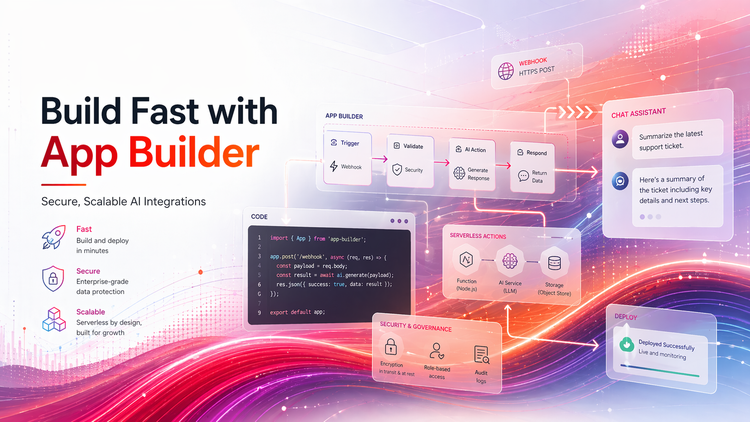
At Adobe Summit 2026, Rohan Kapoor, Product Manager for Adobe Developer App Builder, opened his session with a simple observation. Every enterprise AI integration eventually runs into the same wall. Security, scalability, and speed all need to be solved at once, and building the infrastructure to deliver all three is a massive undertaking that has nothing to do with the thing the team actually wants to ship.
The premise of the session was equally simple. Instead of each team building and maintaining that infrastructure itself, App Builder provides it out of the box. The team plugs in and focuses on what they are building on top, not on the plant underneath.
This article covers the three constraints App Builder solves, the DocuBot demo that made it real, the production blueprints emerging from customer teams, and two experimental patterns — Agent Skills and MCP servers on App Builder — that point at where this is heading.
The Three 3s You Cannot Skip
DocuBot: A Real App, Built in Hours
Production Blueprints
Experimental Patterns
What This Means for Teams
The Three 3s You Cannot Skip
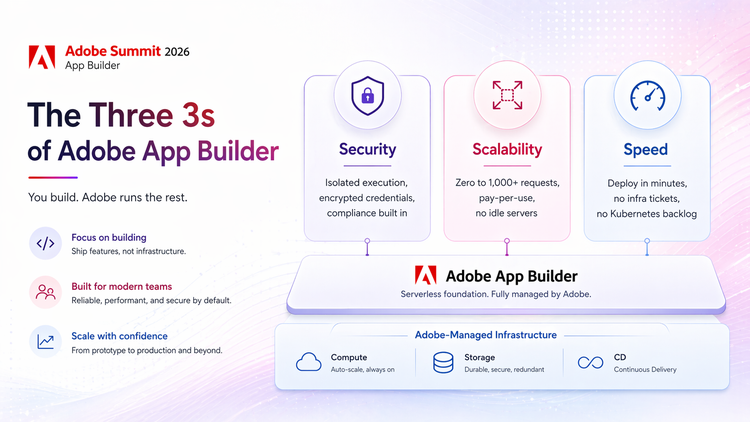
Before any feature discussion, the session grounded the audience in what App Builder takes off the plate:
- Security. Isolated execution, encrypted credentials, compliance baked in. No one on the team writing their own sandboxing.
- Scalability. Zero to a thousand requests on a pay-per-use model. No idle servers, no capacity planning, no scaling theater.
- Speed. Shipping and deployment in minutes. No infrastructure tickets. No Kubernetes in anyone’s backlog.
Adobe handles compute, storage, and continuous delivery, so teams do not have to worry about building the plant. Just plug in and go.
DocuBot: A Real App, Built in Hours
To make the premise concrete, the session walked through DocuBot, an AI-powered Slack bot built in Cursor in a few hours and deployed to App Builder in minutes.
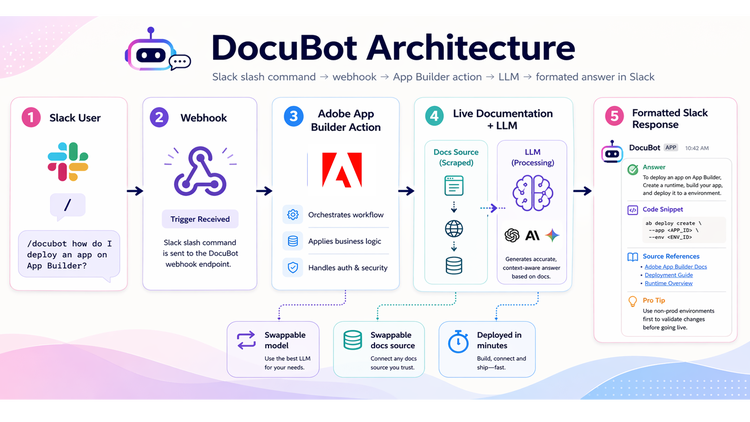
The setup is straightforward:
- A user types a /slash command in Slack, which triggers a webhook.
- The webhook hits an App Builder action.
- The action scrapes live documentation and sends the content to an LLM.
- The LLM thinks for a few seconds and returns a formatted answer with code snippets, source references, and a pro tip, all directly in the Slack channel.
The demo put two questions to the bot live: how to deploy an app on App Builder, and whether App Builder has a database. In both cases the responses were clean, well-structured, and contextually aware — the database answer even referenced the recently released App Builder database capability, because the underlying documentation set had it.
A few notes for developers evaluating this pattern. The LLM is swappable — the demo used the Groq API with Llama, but teams can plug in their own token and model. The documentation set is also swappable — the bot was pointed at App Builder docs, but could be redirected to AEM, Adobe Commerce, or any public documentation. After deployment, an end-to-end test covers HTTP status codes, input validation, security checks, and rate-limiting, with concrete recommendations rather than pass/fail output.
Production Blueprints
Beyond a demo, the session shared two patterns observed repeatedly across customer teams building on App Builder.
Blueprint 1 — Running custom logic at scale
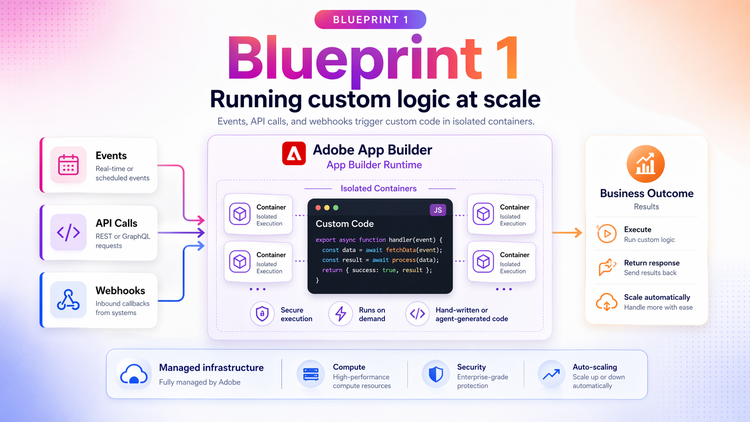
The first blueprint applies to developer teams running custom logic triggered by their actions — events, API calls, and webhooks. Hand-written or agent-generated code runs in an isolated container, executes, and returns results. Alongside DocuBot, Workfront Fusion is a good example: modules let customers define and run custom functions inside Fusion scenarios, each running in its own isolated container. The value is custom code execution at enterprise scale without building or maintaining the infrastructure underneath it.
Blueprint 2 — Content supply chain automation
The second blueprint is aimed at creative ops and brand teams managing content at scale. The session described a pipeline where Illustrator handles brand assets, Firefly handles generation with brand guidelines applied, Photoshop handles refinement, and App Builder orchestrates the whole workflow. Style guides flow in, branded content comes out.
The more interesting direction is what becomes possible once the pipeline is fully programmable. Intelligent content analysis and predictive routing — letting AI figure out where content should go next — move from roadmap ideas to configurations a team can stand up this quarter.
Experimental Patterns
Beyond production, two patterns are being built on top of App Builder that are worth watching.
Agent Skills
A standardized way to define capabilities that AI assistants can discover and use. A skill.md file contains metadata, documentation, and known issues for a given capability. An AI assistant — Claude, Cursor, or another — reads that definition and knows how to use it. A developer can ask the assistant to “find me a page that uses the hero block” and the flow looks like this: the AI reads the skill definition, calls an App Builder action, the action queries AEM’s API, and the developer gets a list of matching pages back.
MCP Servers on App Builder
Model Context Protocol gives LLMs conversational access to enterprise backends. On App Builder, an MCP server sits between an AI assistant and whatever backend system holds the data. Ask “show me some car models” and the request hits App Builder, authenticates to the inventory system, pulls data, transforms the request into an AEM Content Fragment, and returns the response in-conversation. The same pattern applies across industries — room availability for travel, data usage for telecom, account summaries for banking.
What This Means for Teams
For developer teams
Stop scoping sandbox infrastructure into every AI integration project. If the use case fits into “event or webhook triggers custom logic that calls an external service,” App Builder is likely the fastest path to production. Spend the saved time on the LLM choice, prompt design, and evaluation harness.
For creative ops and brand teams
Blueprint 2 is an invitation to treat the content supply chain as a program, not a series of manual handoffs. The gating question is not whether the tools integrate — they do — but whether your brand guidelines are specific enough for a pipeline to enforce them.
For architects and Adobe partners
Agent Skills and MCP on App Builder are how Experience Cloud starts exposing itself to external AI agents on equal footing with internal ones. Architects who map out which capabilities should become MCP-accessible, and in what order, will be ahead of the teams that treat this as a 2027 problem.
The takeaway
Rohan closed with a line that is worth holding onto. App Builder is a power grid, and it is live. The rest is just deciding what to build on it.