Choosing your AEM Assets Distribution Portal

Some time ago, before AEM Assets was a stand‑alone offering and before AEM as a Cloud Service was even an idea, I worked on a distributed DAM project. The objective was to provide CMS authors and other business users with a simple way to search, use, and track license‑rights deadlines across remote systems without granting everyone access to AEM Author.
Today, AEM Assets, a leading DAM solution, sits at the center of the Content Supply Chain, especially for customers working in the Adobe ecosystem. It serves as the single source of truth that governs metadata, permissions, rights, and versions from creation through activation. By integrating tightly with Creative Cloud, Workfront, Sites/Commerce, and distribution portals, it streamlines handoffs and ensures that approved, reusable assets reach every channel quickly and consistently.
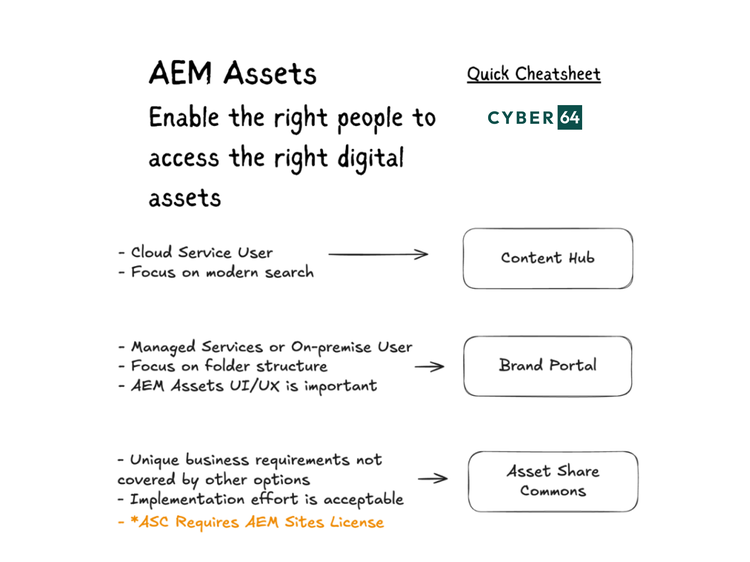
Adobe offers various solutions for distribution portals to enable the right people to access the right digital assets. Here’s a short overview with key questions to ask before deciding when to use Content Hub, Brand Portal, or Asset Share Commons. Casey Witter published and amazing Adobe Perspective blog on Experience League, and here is my summary with quick cheatsheet to help you make correct decision.
TL;DR Pick this if…that
Content Hub
Brand Portal
Asset Share Commons
TL;DR Pick this if…that
- Content Hub → You want a search‑first, modern UI you can stand up fast, on AEM Assets Cloud Service, with all the latest innovations.
- Brand Portal → You’re on Managed Services or On‑Premise and your users think in folders. You need a quick, turnkey rollout.
- Asset Share Commons* → You need a custom-built, fully customizable portal and have a dev team ready to implement.
*AEM Sites license is required for Asset Share Commons.
Content Hub
- Fast to launch. It is self‑deployable and included with AEM Assets Cloud Service.
- Better performance with significantly faster ingestion and search, plus dynamic filtering and downloads.
- In Adobe's focus, so all new enhancements land here first.
- Ready for the content supply chain with AEM as the single source of truth. Content Hub also integrates with Workfront and Creative Cloud, so workflows are reflected in the portal.
- Designed with a search‑first, asset‑focused UX that reflects how users actually find assets today.
When to choose something else
- You need a heavily custom-built portal.
- You’re on Managed Services or On‑Premise (Content Hub is Cloud Service only).
Brand Portal
- OOTB and quick to configure and launch.
- Folder‑based UI that mirrors the AEM Assets UX, great if your users live by folder hierarchies.
- A good choice for On‑Premise customers if the capabilities fit business needs.
When to choose something else
- You’re modernizing to a search‑first paradigm.
- You need deep customization.
Asset Share Commons
- Maximum flexibility to build exactly what you need using open‑source AEM project archetypes and components.
- Works with all AEM flavors — Cloud Service, Managed Services, or On‑Premise.
- Supports complex permission models and tailored login experiences.
When to choose something else
- You don't have AEM Sites licensed.
- You need a quick, easy‑to‑configure solution or something fully OOTB.
- You don’t have a development team to implement and maintain it.