Create Once, Publish Everywhere: How AEM Guides Simplifies Multi-Channel Documentation
The Challenge of Multi-Format Documentation
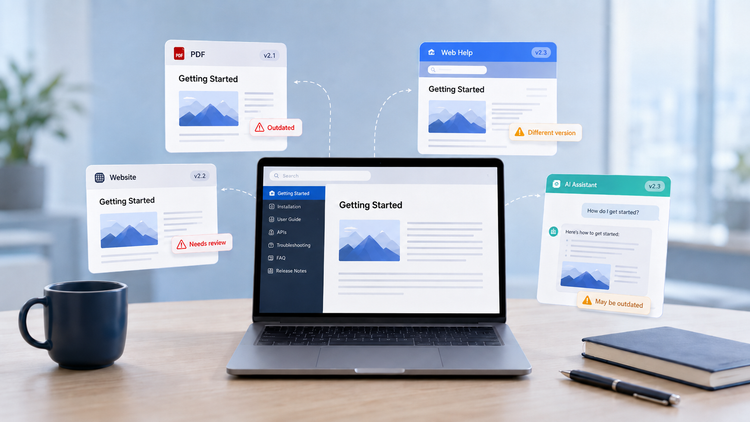
Delivering documentation across multiple channels can be tedious without a system like Adobe Experience Manager (AEM) Guides. Teams often spend hours manually updating PDFs, web portals and internal wikis, where even minor edits can result in errors or inconsistencies. Today’s documentation demands make this approach even more challenging: customers expect accessible and searchable online help, modern websites where content is easy to discover and AI-powered experiences where the right information can find them in the moment they need it. Compliance teams require official, version-controlled PDFs, while product managers rely on accurate and up-to-date release notes on websites. Large amounts of content make it difficult to locate and update specific information, while handling each output separately takes up significant time and effort.
AEM Guides allows content authors to create documentation in form of topics and maps in one place and publish them across multiple formats such as PDFs, HTML5 portals and AEM Sites. This single-source approach eliminates repetitive work, ensures consistency and accelerates the delivery of documentation across all channels.
Understanding DITA: The Foundation of Structured Content
Publishing to Multiple Outputs
Single-Source Editing: One Update for All Outputs
Targeting the Right Audience
Design and Branding Across Outputs
Automation and Integration
Conclusion
Understanding DITA: The Foundation of Structured Content
Before exploring publishing, it is important to understand the foundation of AEM Guides: DITA, or Darwin Information Typing Architecture. DITA is an XML-based standard for structured content built around modularity and reuse. Content in DITA is organized into topics and maps. A topic is a small, self-contained unit of information, such as a concept, task or reference topic like “General Safety Notes” or “Safety Guidelines.” A map serves as a framework that assembles these individual topics into a complete structure, such as a guide, manual or help portal, without duplicating or rewriting the content. It works like assembling reusable building blocks to create a coherent and complete piece of documentation.
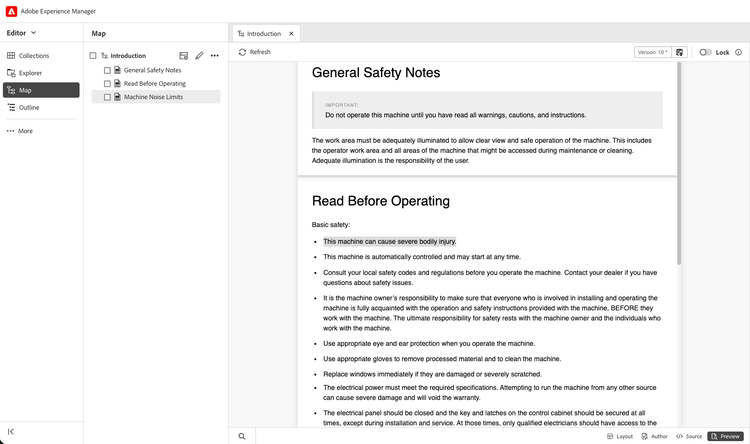
Even though content is stored in DITA, authors do not need to understand XML or have a technical background to work with AEM Guides. The platform includes a built-in web editor that lets writers create and edit topics and maps visually, much like using a word processor. Authors can also choose to edit the source directly when they need more control, and in newest version, they can use a side-by-side editor to view and work with both the visual editor and source view at the same time. This flexibility allows teams to work in the way that best fits their skills while still keeping content structured and consistent.
If the content already exists in formats such as DITA, Word, HTML, Markdown, InDesign or FrameMaker, there is no need to start from scratch. Existing DITA content can be uploaded directly, while non-DITA documents can be converted into DITA using migration tools that help preserve structure, formatting and important details.
However, migration is rarely a one-size-fits-all process. Every documentation set is structured differently, and the quality, consistency and organization of the source content can vary significantly. Migration is often a good opportunity to review how content is organized, identify duplicated or outdated information and transform the content into a cleaner, more reusable structure.
Migration to AEM Guides typically involves more than converting files. It requires reviewing the existing documentation, defining the right migration approach, restructuring content into DITA and adapting the process to the source formats, content structure and publishing goals. We can support teams through this process by helping assess the current content, plan the migration and implement custom workflows that result in documentation that is easier to maintain, reuse and publish across multiple channels.
Publishing to Multiple Outputs
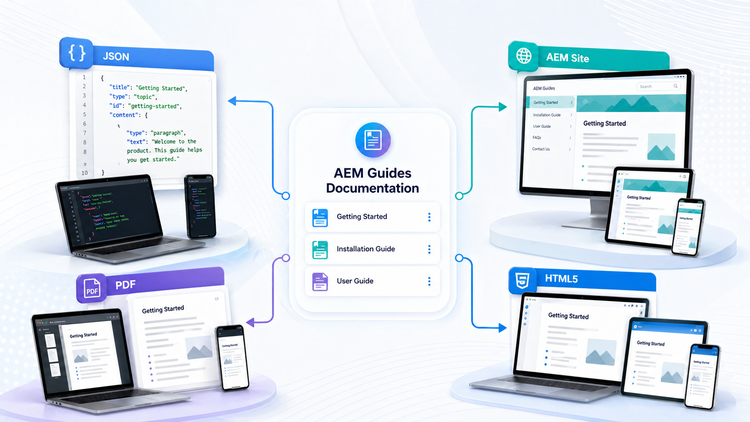
Once content is created in AEM Guides, it can be published from the same source into multiple output formats, including PDF, HTML5, AEM Sites, JSON, EPUB, Knowledge Base and custom outputs. This means the same content can become a printable manual, an online help portal, a branded website page, a knowledge base article or structured content for other digital experiences.
Each output is managed through an Output Preset, which defines how the content should be published. Presets control settings such as the format, template, styling, filters and destination. For example, one preset can generate a customer-facing PDF, another can publish web help, and another can deliver content to AEM Sites. New presets can also be created for different brands, regions, products or publishing requirements.
Single-Source Editing: One Update for All Outputs
One of AEM Guides’ most compelling features is single-source editing. Instead of maintaining the same sentence, disclaimer, product specification or company information separately in each PDF, website, help portal or internal document, teams manage the content from one source.
When a sentence needs to change, authors update it once in the source topic. The same updated content can then be republished to every output where it is used, such as PDFs, HTML5 portals, AEM Sites pages, knowledge base articles or other digital channels. The team does not need to manually open and edit each output separately. Only the source content changes, the outputs are regenerated from that source.
This reduces repetitive work, avoids inconsistencies and makes it easier to keep documentation accurate across all products and channels. Later in the publishing process, this republishing can also be automated, so approved changes can be pushed to the required outputs with minimal manual effort.
Targeting the Right Audience
Multi-channel publishing is not only about where content is delivered, but also about who receives it. Not every reader needs the same information. A service technician may need repair procedures and diagnostic details, while an end user may only need setup instructions and safety information. A distributor may need logistics or ordering details that should not appear in the customer-facing version.
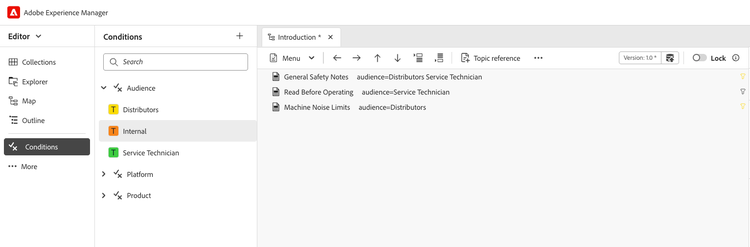
AEM Guides supports this through conditional publishing. Instead of creating separate copies of the same content for each audience, teams can use DITA attributes such as audience, product and platform to control when specific content should appear. For example, content can be tagged for a specific audience, product model, software version or operating system. This tagging can apply to an entire document or to smaller sections within the content. During publishing, AEM Guides uses these rules to include only the relevant content in each output.
Baselines add another layer of control by capturing the exact versions of topics, maps and assets that should be used for a specific release or publication. This is especially useful when teams need to republish older product documentation, maintain version-specific manuals or ensure that a published output always reflects an approved set of content.
With this setup, teams do not need to maintain separate documentation sets for each audience or output. They define the source content, apply the right publishing rules and generate the required outputs from the same controlled content base. A customer guide, service manual, distributor handbook or version-specific release package can all be produced from the same documentation set, while still including only the information that is relevant for each case.
Design and Branding Across Outputs
AEM Guides not only manages content, but also gives teams control over how documentation looks and feels across different outputs. Instead of manually formatting each PDF, web help portal or AEM Sites page separately, teams can define styling and branding rules that are applied during publishing.
This helps keep headers, footers, fonts, page layouts, colors and common content elements consistent across outputs. Notes, warnings, tips, tables and other reusable components can follow the same design rules wherever they appear. As a result, teams spend less time adjusting formatting manually and more time creating clear, accurate and on-brand documentation.
Automation and Integration
Once content, output presets and publishing rules are defined, the publishing process can also be automated. AEM Guides supports automation through REST APIs and workflows, allowing documentation to be generated on a schedule, for example triggered by content approval.
This means teams do not always need to manually regenerate each output after every approved change. For example, when a topic is updated and approved, the required PDF, HTML5, AEM Sites, JSON or Knowledge Base output can be generated again from the same source content. Automation helps keep documentation synchronized with product changes, reduces manual publishing effort and makes the release process more reliable.
Conclusion
AEM Guides gives content teams a powerful way to manage, reuse and publish documentation at scale. By combining structured DITA content, single-source editing and multi-channel publishing, it allows teams to create content once, manage it in one place and deliver it across every required channel without maintaining separate versions of the same information.
Even a small update, such as changing one sentence in a reusable topic, can be reflected across every output where that content is used. Conditional publishing helps ensure that each audience receives only the information that is relevant to them, while baselines provide control over the exact content versions used for specific releases or publications.
With Output Presets, publishing rules and automation, AEM Guides becomes more than a documentation tool. It becomes a scalable publishing framework that helps teams reduce repetitive work, prevent inconsistencies and keep documentation aligned with product changes. When these capabilities are tailored to an organization’s content structure, publishing requirements and approval processes, they create a more efficient path from authoring to delivery. Combined with automated publishing workflows, this allows accurate, relevant content to reach end users faster and with greater consistency.

Martina Mikolić
Subject Matter Expert - AEM Guides | AEM Technical Architect
- @martinaricijas
- martina.ricijas@cyber64.com