Intro to AEM Dispatcher & Caching with Dispatcher

When I first started developing with Adobe Experience Manager (AEM), I quickly learned that the Dispatcher is a important part of any AEM deployment.
In simple terms, the Dispatcher is AEM’s "built-in" caching and load balancing module that runs on a web server (like Apache HTTP Server or IIS). It sits between the AEM publish instance and the outside world, working alongside a static web server to deliver content efficiently.
In this article, I’ll try to explain what the AEM Dispatcher is and how it works with AEM and web servers. In this series of articles, I will go through it's core functions of caching, load balancing, and security. As an AEM expert, understanding the Dispatcher’s role is crucial in daily work to ensure the sites we develop are fast, stable, and secure.
What is the AEM Dispatcher and Why Do We Need It?
What is the AEM Dispatcher and Why Do We Need It?
At its heart, the Dispatcher helps combine the best of static and dynamic content delivery.
A traditional static web server is extremely fast at serving files (it can just fetch an HTML or image from disk or memory), but AEM’s dynamic content generation offers rich personalized experiences but is very intensive on resources. The Dispatcher bridges these two by caching as much content as possible as static files, and only delegating to AEM when needed.
Repetitive requests for the same content (e.g. a published page that doesn’t change often) are served quickly from cache, while AEM is invoked minimally for fresh or uncached content. By storing rendered pages as static files and serving them directly, the Dispatcher dramatically reduces load on AEM and speeds up response times for users. It turns part of your dynamic site into a static website for optimal performance, without losing the ability to generate content on the fly when necessary.
Caching or Accelerating Content Delivery
Caching is the Dispatcher’s primary function and biggest performance booster. The Dispatcher caches rendered content from the AEM publish instance as flat files on the web server’s file system. It behaves like a reverse proxy cache. The first time a page or asset is requested, the Dispatcher fetches it from AEM and saves a copy in the web server’s document root. Subsequent requests for that content can be served directly from this cache, as if they were static files on a plain web server. This lowers response times and reduces the load on AEM. Dispatcher can handle a huge volume of traffic by serving most requests from cache, with AEM publishers only handling the cache misses.
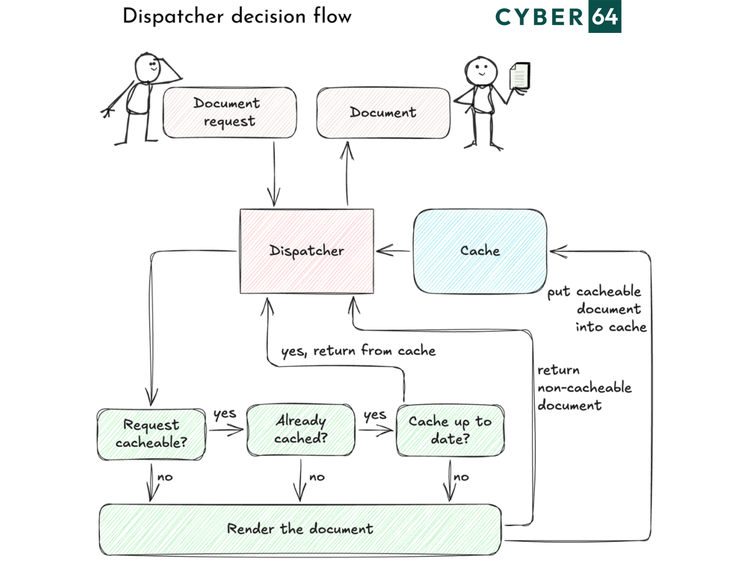
The Dispatcher gives us control over what gets cached. In the configuration, we define which HTTP requests are cacheable. For example, we typically cache GET requests for HTML pages, images, and client libraries, but we might exclude dynamic queries or secure content. Some rules are built-in: any request with a query parameter (?) is treated as dynamic and not cached, and requests without an extension (which the web server wouldn’t know how to serve as a file) are passed through to AEM. By default, Dispatcher only caches GET or HEAD requests, content that might change via POST is not cached. We also ensure authenticated sessions are not cached, so users don’t see each other’s private content. These decisions keep the cache safe and coherent.
One area that often confuses developers (including myself when I was new) is how the Dispatcher handles cache invalidation. Dispatcher supports two caching strategies: Content Updates and Auto-Invalidation.
Content Updates
With Content Updates, whenever an author publishes (activates) content, AEM sends a flush request to the Dispatcher. The Dispatcher then removes the specific content files that changed from the cache. For example, if /content/site/en/home.html is updated, the Dispatcher will delete /en/home.html from the cache, as well as any related files (like /en/home.* such as Home’s images or fragments). It updates a special timestamp file (the “statfile”) to record when the last publish happened. The next time that page is requested, Dispatcher will fetch the new content from AEM and cache it afresh. This selective invalidation ensures that outdated pages are flushed out immediately upon content changes.
Auto Invalidation
With Auto Invalidation, the approach is slightly different: instead of eagerly deleting files, the Dispatcher marks them as stale by updating the statfile timestamp, but leaves the files in place. The cached files remain on disk, but when a user requests one of those files, the Dispatcher compares the file’s last modified time with the statfile timestamp. If the cached file is older (meaning the content might be outdated), Dispatcher knows it must fetch a fresh copy from AEM (and then it updates the cache). If the cached file is still newer than the last content change, it serves it directly. Auto-invalidation is powerful for complex sites where it’s hard to predict which pages depend on a change. You don’t delete everything up front, but any stale content is refreshed on-demand.
Additional Tips
To further improve caching effectiveness, I carefully design which URLs are cacheable. Typically, we enable caching for nearly all public content (pages, images, scripts, CSS) and disable it for things like search results or user-specific data. The Dispatcher can be configured to cache HTML by default but ignore specific selectors or query strings if needed. We always leverage features like grace periods (serving slightly stale content if AEM is down or slow) and cache warming (preloading cache after deployment) as needed, though those are more advanced topics. The key point is that Dispatcher’s caching, when tuned, offloads the majority of traffic from AEM.
Summary
AEM performance isn’t just about AEM development, components and logic you built in, it’s how you deliver what AEM publishes and design your content to be cacheable and easy to ship. Dispatcher helps you scale by serving requests to static content from cache, reducing publish load, and removing stress from servers.