Intro to AEM Dispatcher - Load Balancing with Dispatcher

Another core function of Adobe Experience Manager (AEM) Dispatcher is load balancing across multiple AEM publish instances. In a production environment, you usually have a farm of publish servers (multiple AEM instances running the publish role) to handle incoming traffic. The Dispatcher can be configured with a list of these instances (called “renders” in the config) and will distribute incoming requests among them.
By spreading requests across a cluster of AEM publish servers, the system can handle more load than a single instance, improving overall throughput and reliability. Each publish instance has fewer pages to render, leading to faster responses, and if one instance goes down, others can take over to keep the site running (with reduced capacity, but still available).
Usual Architecture Setups & Trade-offs
How Dispatcher Selects a Render (Load Balancing Algorithm)
Failover and Retry Behavior
Biggest takeaway - Avoid Over-scaling: Cache Sync and Invalidation Risks
Final Tips & Best Practices
Usual Architecture Setups & Trade-offs
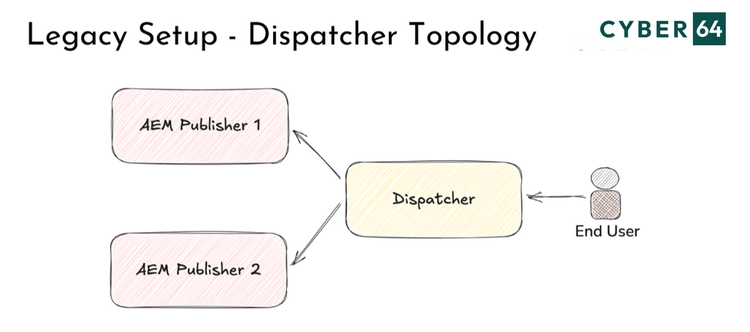
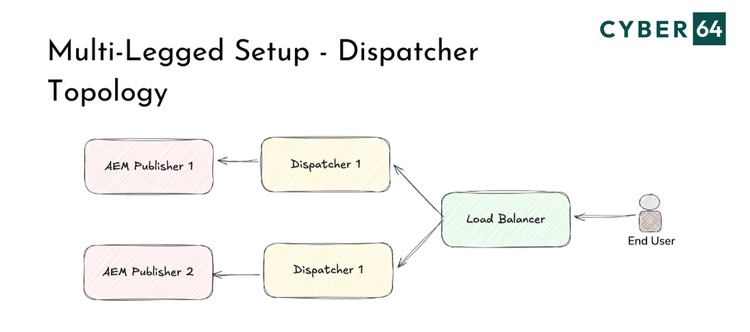
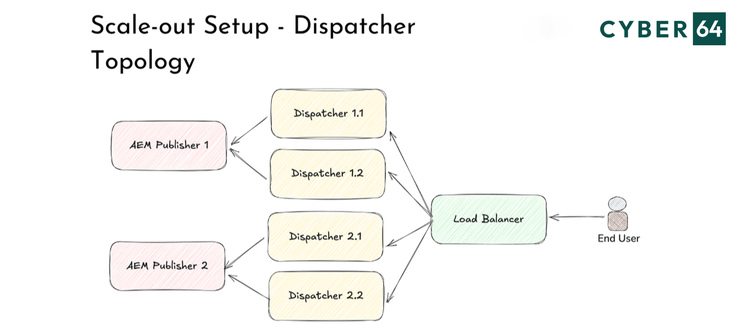
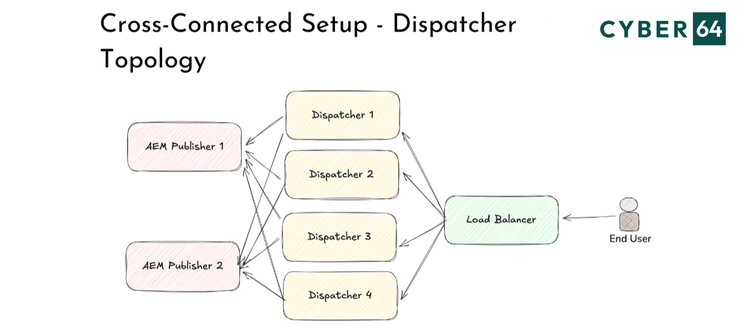
Topology of dispatcher setup usually follows business, load and infrastructure requirements. Other important factor is if AEM is hosted on-premise or as AEM as a Cloud Service. There are couple of patterns, that are also documented by Adobe, so let's just take a brief look:
Legacy setup considers 1:N setup, with single Dispatcher that sits in front of multiple Publish instances. This setup is generally simple, but lack redundancy and it's not recommended for new deployments.
Multi-Legged setup or 1:1, with one Dispatcher per Publish instance is the usual choice for on-premise deployments. This approach offers resilience, easy cache invalidation, and rolling deployment flexibility.
Scale-Out setup where multiple Dispatchers are connected to one Publish increases throughput but also raises complexity. There are related cache invalidation challenges. Because of this, such topology is better suited for read heavy workloads with infrequent updates.
Cross-Connected setup is when each Dispatcher connects to all Publishes. This will provide best redundancy but it will add significant configuration complexity and stickiness coordination. This setup is very error-prone if there is no proper automation in place.
Which Topology Should You Choose?
Each of these topologies serves a different operational goal, and the choice depends on your deployment strategy, automation tooling, update frequency, and whether you're managing infrastructure yourself or relying on Adobe-managed services.
For On-Prem Deployments the Multi-Legged Setup is generally the best choice. It allows you to independently maintain and update each Dispatcher+Publish pair, provides clean failover handling, and simplifies cache management.
For AEM as a Cloud Service (AEMaaCS) the infrastructure is abstracted and defined by Adobe. Customization is possible but questionable. For example if you're customizing your CDN or using edge logic, a simplified Scale-Out Setup aligned with Adobe's Cloud Manager and Fastly CDN will most probably deliver optimal performance. Stick to stateless, horizontally scalable patterns and avoid overly complex dispatcher logic.
How Dispatcher Selects a Render (Load Balancing Algorithm)
The load balancing algorithm in Dispatcher keeps track of simple response statistics to decide which instance should handle the next request. It uses a basic round robin approach that is adjusted by each instance’s responsiveness.
Dispatcher maintains an internal score for each publish instance (per content category) that reflects previous response times and any failed connection attempts. This will balance the load so that slower or unresponsive instances automatically receive less requests.
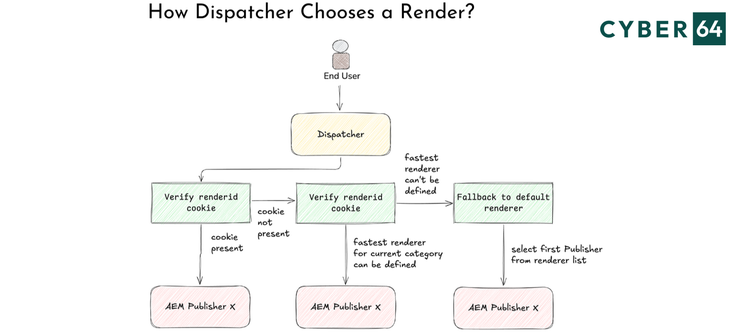
Main parts of the selection algorithm:
1. Sticky cookie check
If the incoming request contains a render identifier cookie (renderid) pointing to a specific publish instance, Dispatcher will use that instance straight away.
2. Dynamic selection
If there is no sticky affinity cookie, Dispatcher determines the content category of the request (HTML pages, images, etc.) and compares the current scores of each publish instance for that category. Each category’s score is a measure of how quickly and reliably each instance handled those requests in the past. Dispatcher then picks the instance with the lowest score (fastest responder) for that category and forwards the request there.
3. Default renderer
If no instance was selected in the above steps (for example, if no stats exist yet on startup), Dispatcher will fall back to the first render in the list.
After each request, the Dispatcher updates the score for that instance’s category based on the response time or any failure.
- A quicker successful response will keep the score low
- A slow response or a failed attempt will increase the score, making that instance less likely to be chosen next time
Failover and Retry Behavior
Dispatcher provides automatic failover by retrying requests on another publish instance when the selected one is offline, unreachable, or returns certain error codes, improving fault tolerance.
Failover behavior depends on configuration, and enabling /failover flag in the dispatcher farm tells Dispatcher to resend requests to a different render when the original fails. For example, a 503 Service Unavailable triggers an immediate retry on another instance, while 500-level errors can optionally trigger a quick health check first.
If the configured /health_check URL fails, Dispatcher penalizes that server and routes the request to a healthier instance. If it succeeds, Dispatcher returns the original error instead of failing over.
In production env, tuning /numberOfRetries, /retryDelay, enabling failover, and providing a simple 200 OK health check endpoint are good approach to keep the site resilient during outages or maintenance.
Sticky Sessions and When to Use Them
Sticky connections (sticky sessions/session affinity) make sure a user’s requests consistently go to the same AEM Publish instance instead of switching between servers. When enabled, Dispatcher sets a renderid cookie that identifies the chosen publish instance, and future requests under the configured sticky path are routed to that same “render” server.
Sticky sessions are useful when AEM keeps user state in memory on a specific publish node (e.g., authenticated areas, e-commerce, portals). Since publish instances don’t share session state by default, sending a user to a different instance can make them appear logged out or lose session data.
Sticky sessions are configured by using /stickyConnectionsFor to define which paths require affinity (e.g., /products or /user). The first request selects an instance and sets renderid, and all subsequent matching requests will stick to it.
Tip: Avoid overusing stickiness because it reduces load-balancing efficiency and can overload one publish while others are underused. For public, mostly read-only content, keep traffic stateless so Dispatcher can distribute requests freely.
Also, don’t cache personalized pages that require stickiness—otherwise one user’s content may be served to others. Finally, if you enable stickiness, harden the renderid cookie by setting it HttpOnly and Secure in the /stickyConnections configuration.
Biggest takeaway - Avoid Over-scaling: Cache Sync and Invalidation Risks
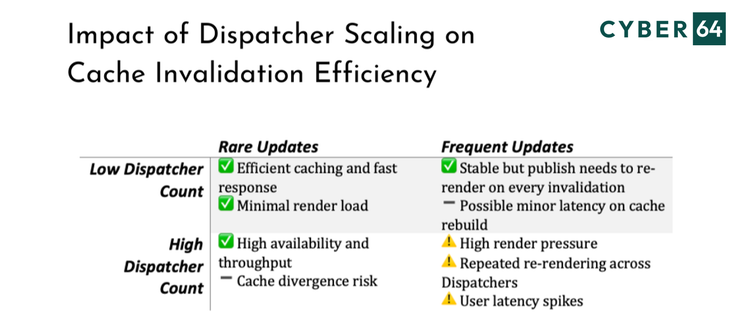
Scale-out topologies with many Dispatchers can backfire if your site invalidates content frequently. If each Dispatcher has its own cache, a new article invalidates all caches, and each Dispatcher will request fresh pages independently. This results in redundant rendering load on Publish instances and increased latency for end users. General recommendation is to:
- Limit the number of Dispatchers per Publish in high-churn content sites.
- Consider cache pre-warming or centralizing caching layers with care.
- Avoid shared file systems like NFS unless you’ve benchmarked performance.
Remember, always avoid over-scaling as it brings additional challenges. This matrix illustrates how varying the number of Dispatchers and the frequency of content updates impacts performance and caching behavior in AEM Dispatcher configurations.
Final Tips & Best Practices
To summarize, here are best practices and common pitfalls when configuring Dispatcher related to load balancing
- Use Dispatcher load balancing across multiple publish instances and enable /failover so traffic reroutes automatically if one node goes down.
- Configure a lightweight health check endpoint (e.g., /system/health) and set it via /health_check so Dispatcher can detect unhealthy instances accurately.
- Enable sticky sessions only where session affinity is truly needed (typically authenticated or in-memory state) and keep public traffic stateless when possible.
- Avoid caching personalized or session-dependent pages by marking those paths as non-cacheable to prevent data leakage and preserve personalization.
- Monitor Dispatcher logs and statistics to spot uneven distribution or frequent failovers, and consider separate stats categories for heavy request types.
- For planned maintenance, temporarily remove the instance from /renders (or take it out of rotation upstream) and flush caches if needed for a clean cutover.
- In most cases a single Dispatcher with multiple renders is sufficient, but for very large or critical setups you can add an external load balancer (Nginx/F5/ALB, etc.) for advanced routing and isolation.
- Rolling updates are easier in a Multi-Legged setup, where you can take down one Dispatcher-Publish pair, upgrade and smoke test it, and then rotate to the next.
Conclusion
AEM Dispatcher is more than just a caching layer, it's a critical piece of your delivery infrastructure, enabling resilient load distribution, failover, and performance optimization. The key to success lies in choosing the right topology for your environment, understanding how Dispatcher routes requests, and applying session and cache strategies with intention. Whether you're managing AEM on-prem or in the cloud, thoughtful Dispatcher configuration will make your system faster, safer, and easier to maintain. Keep it stateless when you can, stay lean on scaling, and let the infrastructure work for you.