Adobe Target’s Experimentation Workflow Upgrade in 2026
Most A/B tests I review have one of two problems: they are stopped too early, or they never had enough traffic to reliably detect the difference the team was looking for. The activity can be perfectly implemented in Adobe Target and still fail to answer the business question.
Over the last few months, Adobe has quietly added several features that address different parts of that problem.
Not just how you build a Target activity, but how you plan it, run it and interpret the result.
The most recent addition is the new Sample Size Calculator, now available directly inside Target as a beta.
But it fits into a bigger experimentation workflow that has been taking shape across Target and CX Enterprise.
Plan: can this experiment answer the question?
A simple example
Minimum Detectable Effect is probably the most useful addition
Run: what changed while the test is live
Less flicker also improves the experiment itself
Read: AI Insights arrived in the same release as the calculator
And Coworker is moving into the same workflow
Plan, Run, Read: the complete workflow
Closing thoughts
The calculator is still the part I would start with
What I would like Adobe to add next
The bigger change is the workflow
Plan: can this experiment answer the question?
Adobe has had a public sample size calculator for years. The old calculator was useful, but fairly narrow. You entered assumptions such as baseline conversion rate, expected lift, daily traffic, number of offers, confidence level and statistical power, and estimated how much sample or time the activity needed.
The new calculator is now available directly from the Target Activities menu and goes further. For Target reporting, the workflow will feel familiar. For CJA / Adobe Analytics reporting, you can choose what you actually want to calculate:
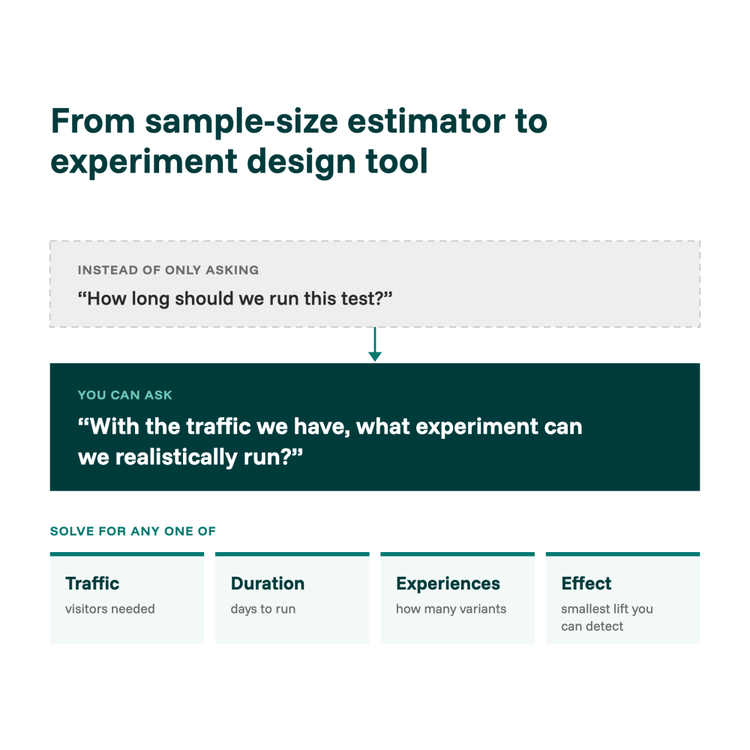
- Duration
- Number of experiences
- Traffic volume
- Minimum Detectable Effect
That changes it from a simple sample-size estimator into something closer to an experiment design tool. Instead of only asking How long should we run this test?, you can ask With the traffic we have, what experiment can we realistically run?
A simple example
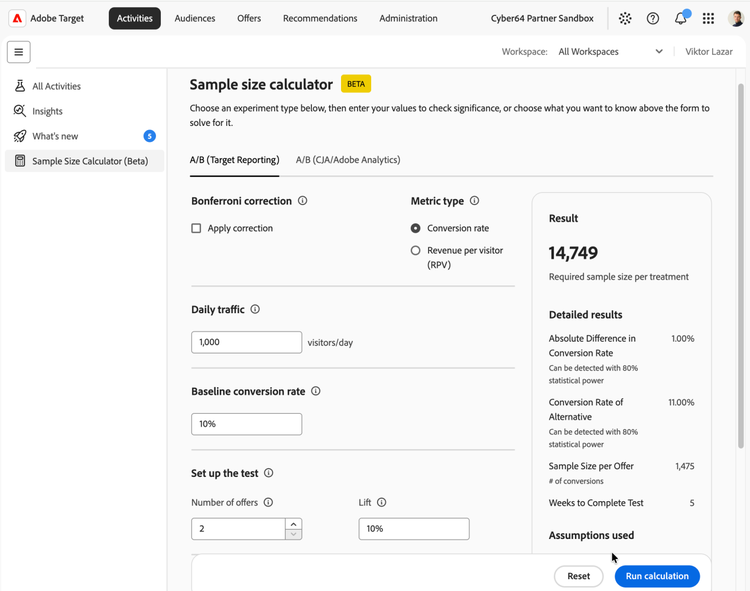
Imagine a page with a 10% baseline conversion rate and 1,000 visitors per day, where you want to detect a 10% relative lift (taking conversion from 10% to 11%) across 2 experiences, with 95% confidence and 80% statistical power.
You are looking at about 14,750 visitors per experience, roughly 29,500 in total, or around 30 days of traffic for a traditional fixed-horizon test.
So if the original plan was "Let's run it for two weeks", you can already see the problem before anyone builds the activity: two weeks gives you roughly half the sample the experiment was planned around.
That is the practical value of doing this calculation first. The important change is the mindset, which moves from "How long do we want to run it?" to "How long does the experiment need to run to answer the question?"
Minimum Detectable Effect is probably the most useful addition
Teams often start with “we want five variants” or “we want to detect a 2% improvement,” but a better starting point is to ask what difference you can realistically detect with the traffic and time you actually have.
That is what Minimum Detectable Effect helps answer. If you know your traffic, how long the activity can run, how many experiences you want to compare, and your confidence and power requirements, the calculator can tell you what effect size the experiment can realistically detect.
That can change the experiment before development even starts. Five experiences might be too many, the expected lift might be too small, or the activity might need to run longer. In some cases, the business impact you could realistically detect may not even be large enough to justify running the test.
Finding that out before launch is much better than reaching week four and realizing the experiment was underpowered from the beginning.
Run: what changed while the test is live
Target also changed how you can evaluate results
The Sample Size Calculator is not the only experimentation change this year. This summer, Adobe added Bayesian statistics as an alternative methodology for manual A/B tests with a conversion goal.
Instead of relying only on the traditional Confidence metric, Bayesian reporting introduces measures such as Chance to Beat Control and credible intervals. The practical difference is that you can monitor the results continuously without the same statistical penalty that comes from repeatedly checking a traditional fixed-sample frequentist test.
That is useful because one of the most common behaviours in experimentation is also one of the most problematic: checking the report every morning and stopping as soon as something turns green.
Bayesian reporting does not remove the need for enough traffic or a sensible experiment design. It simply gives you another way to make decisions while the test is running.
Less flicker also improves the experiment itself
Another smaller Target change became generally available in September: content pre-hiding. Instead of hiding the entire page while Target resolves personalization, it hides only the parts of the page the activity is about to change.
That reduces flicker and avoids unnecessary blank-page time. It is not a statistical feature, but it still affects experiment quality. A test can be technically correct and still introduce visible loading behaviour that influences the visitor experience.
Good experimentation is not only about the statistics. It also depends on delivering the experience cleanly.
Read: AI Insights arrived in the same release as the calculator
The September 30 Target release also introduced AI Insights, currently in beta. For manual-traffic A/B tests, it can help generate experiment learnings and optimization opportunities once enough data has been collected.
AI Insights can analyze the experiences, identify attributes that may have contributed to the winner's performance, and suggest follow-up hypotheses or improvements.
That creates a useful workflow:
- Plan the experiment with the Sample Size Calculator.
- Run it with the appropriate statistical methodology.
- Use AI Insights to help interpret what happened and what to test next.
AI can help with interpretation, but it cannot rescue an experiment that was badly designed or underpowered from the beginning. That makes the planning step even more important.
And Coworker is moving into the same workflow
The other interesting direction is CX Enterprise Coworker. Adobe now documents Target skills that can help practitioners explore activities and audiences, create and configure tests, analyze performance, and work with Recommendations.
For experimentation specifically, Coworker can help:
- read experiment results
- diagnose losing variations
- size test durations
- recommend what to test next
I would not treat this as a replacement for understanding experimentation statistics, but it does show where the workflow is heading. Instead of switching between documentation, calculators, reports and separate tools, more of the experimentation process can increasingly be handled from the same environment.
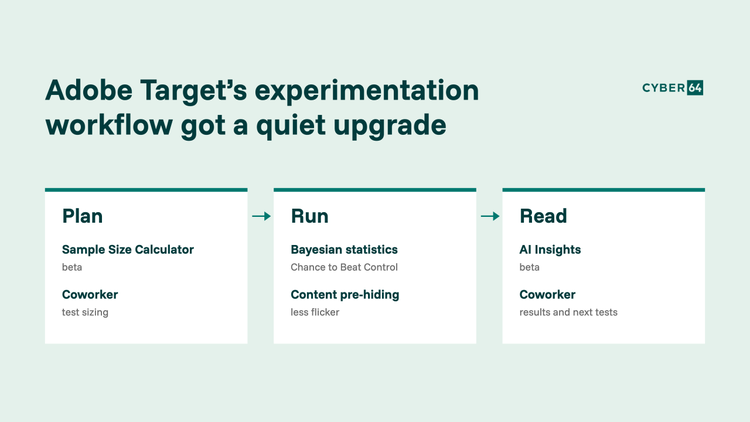
Plan, Run, Read: the complete workflow
Together, the recent changes are more interesting than each feature individually.
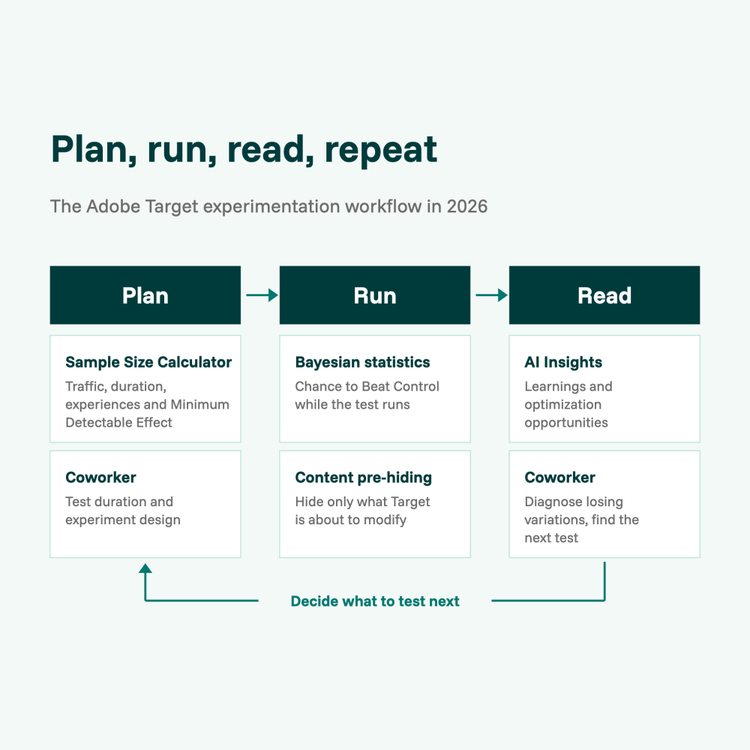
Planning is becoming more structured with the Sample Size Calculator and Coworker helping with traffic, duration, number of experiences, Minimum Detectable Effect and experiment design.
Running the experiment is also improving through Bayesian statistics, with Chance to Beat Control for suitable conversion experiments, and content pre-hiding to reduce flicker by hiding only the parts of the page Target is about to modify.
Reading the results is getting more support as well, with AI Insights generating learnings and optimization opportunities, while Coworker can help analyze results, diagnose losing variations and identify what to test next.
That starts to look less like a collection of separate Target features and more like a connected experimentation workflow.
Closing thoughts
The calculator is still the part I would start with
If I had to pick one of these changes to introduce into an experimentation program first, it would still be the Sample Size Calculator.
A lot of experimentation problems start before the activity even exists: too many experiences for the available traffic, unrealistic expected lift, arbitrary test durations, success metrics that need much more sample than expected, or activities stopped before they had a realistic chance of answering the question.
If the experiment is badly sized, better reporting will not fix it. AI will not fix it either.
The calculator helps move that discussion earlier, when there is still time to change the design of the experiment before building it.
What I would like Adobe to add next
The Sample Size Calculator and AI Insights are both still in beta, so there is room to build on them.
One thing I would like to see is the ability to save the experiment sizing assumptions directly with the activity. Even better, Target could eventually prefill some of the inputs using historical Target, Analytics or CJA data, such as baseline performance, historical traffic, variance and results from previous experiments.
That way, the activity would capture not only what we tested, but also why we expected that sample size and duration to be enough.
That would make experimentation decisions much more transparent and easier to revisit later.
The bigger change is the workflow
A year ago, the Target workflow was still largely:
Build → Run → Read report
It is increasingly becoming:
Plan → Run → Understand → Decide what to test next
The Sample Size Calculator is probably the least flashy addition in that chain, but it might also be one of the most useful.
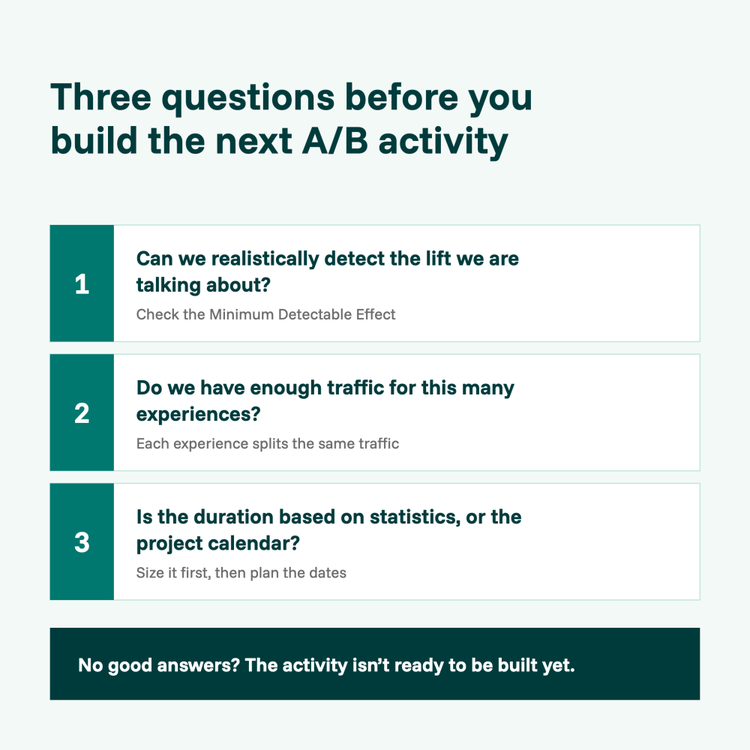
Before building the next A/B activity, I would challenge three assumptions:
- Can we realistically detect the lift we are talking about?
- Do we have enough traffic for this many experiences?
- Is the planned duration based on statistics, or just the project calendar?
If those three questions do not have good answers, the activity probably is not ready to be built yet.